
Looking for the best laptop docks to enhance your productivity? Discover our top 10 picks that offer 4K displays, fast charging, and seamless connectivity for a clutter-free workspace.
A laptop dock can boost productivity. It turns one port into multiple tools. Connect monitors, drives, and more with ease.
These docks offer 4K displays, fast charging, and smooth data transfer. They work with Dell, HP, Lenovo, and other laptops.
Users love the clean workspace and simple setup. Dual or triple screens make multitasking a breeze.
This guide picks the top docks for power and flexibility. Find the one that fits your needs perfectly.
List of Top 10 Laptop Docks
| Image | Title | Best For | Price |
|---|---|---|---|
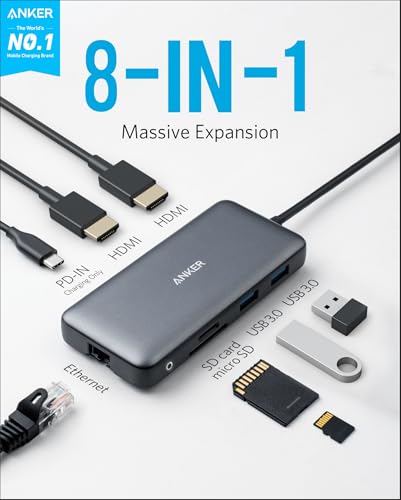 |
Anker Laptop Docking Station Dual Monitor, 8-in-1 USB C Hub, 4K Dual Monitor with 2 HDMI, 1 Gbps Ethernet Hub, 85W Power Delivery, SD Card Reader, for XPS and More (Charger not Included) |
This docking station is perfect for professionals and power users who need to connect dual 4K monitors, fast charging, and multiple peripherals to a USB-C laptop. It’s ideal for Windows, ChromeOS, or Mac users who want a reliable hub with Ethernet, SD card slots, and 85W charging for seamless productivity. |
|
 |
Anker Prime Docking Station, 14-Port with 160W Max Output, 10Gbps Fast Data Transfer, Real-Time Smart Interface, Audio and Ethernet Ports, Dual 4K Displays for Dell, HP, Lenovo and More |
The Anker Prime Docking Station is perfect for anyone who needs to connect multiple devices and work efficiently. It’s great for professionals, students, or anyone using Dell, HP, Lenovo, or similar laptops. |
|
 |
Anker Nano Laptop Docking Station with Detachable Hub, 13-in-1 USB-C Triple Display Docking with 2 HDMI+1 DP, 10 Gbps USB-C, 3 USB-A, Audio, SD/TF, Ethernet, 100W Max PD for Dell, Lenovo, HP, and More |
This Anker Nano Laptop Docking Station is perfect for anyone who needs a powerful, all-in-one workspace. Whether you’re a busy professional, a student, or a remote worker, it gives you easy access to multiple screens and all your devices. It’s great for those who want to switch quickly between desktop setups and mobile work without missing a beat. |
|
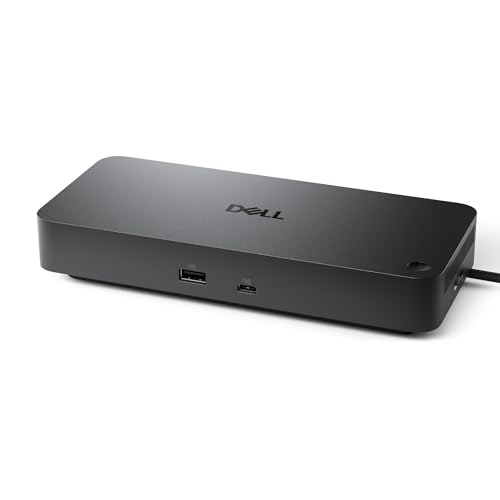 |
Dell Pro Dock WD25 – USB Type-C with DP Alt Mode Connector, DisplayPort/HDMI/USB 3.2 Gen2 Connectivity, Up to 100-Watt Power delivery – Black |
The Dell Pro Dock WD25 is perfect for professionals who need a powerful and reliable docking station. It helps you connect multiple screens and charge your devices fast while keeping your workspace neat and efficient. |
|
 |
Acer USB C Docking Station Dual Monitor with 2 HDMI, 9-in-1 Laptop Docking Station with 4K@60Hz HDMI, USB A&C 3.0, SD/Micro SD, 100W PD, USB C Dock Compatible with Acer/Dell XPS/HP/Mac/Surface etc |
This dock is perfect for professionals or students needing dual 4K@60Hz displays, fast 100W PD charging, and extra ports like USB-A, USB-C, SD/MicroSD. It works with laptops that have USB-C with DisplayPort Alt Mode, like Mac, Surface, Dell, HP, or Lenovo. Setup is easy once permissions are set. |
|
 |
Mukiya USB C Laptop Docking Station Stand, Dock Tablet Stand, 8 in 1 USB C Hub with 4K HDMI, 2 USB 3.0, PD 100W, Universal Dock Station for MacBook Pro/Air/Dell/HP/Surface/Lenovo, Plug and Play |
This docking station is perfect for professionals or students with USB-C laptops who need to expand connectivity and improve workspace ergonomics. It’s ideal for those who want 4K display support, fast charging, quick data transfer, and a portable, adjustable stand for comfortable work setups. |
|
 |
UGREEN 7 in 1 Docking Station Dual Monitor, USB C Hub Dual 4K@60Hz HDMI Display, 10Gbps USB-A/C Data Ports, 100W PD, Aluminum Revodok Pro Laptop Docking Station for HP, Thinkpad, Dell and More |
This UGREEN 7 in 1 Docking Station is perfect for professionals or multitaskers who need dual 4K@60Hz HDMI displays and fast 10Gbps data transfers. It’s ideal for Windows laptop users with full-function USB-C ports seeking 100W PD charging and seamless connectivity for monitors, keyboards, and drives. |
|
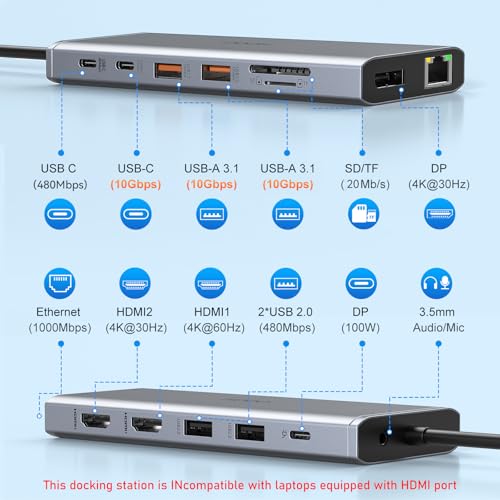 |
USB C Laptop Docking Station Dual Monitor HDMI for Dell/Lenovo/HP Laptop 14 in 1 USB C Hub Multiport Adapter Dongle Dock USB C to 2 HDMI 4K+DisplayPort+Ethernet+4USB+2USB C+100W PD Charger+SD/TF+Audio |
This USB C Laptop Docking Station is perfect for anyone who needs to connect multiple devices to their Dell, Lenovo, or HP laptop. It’s great for work or home, making it easy to use dual monitors, fast charging, and quick data transfers. |
|
 |
Acer Docking Station 3 Monitors, 11-in-1 Laptop Docking Station Stand with DP 8K + Dual HDMI 4K@60Hz, Ethernet, 10Gbps Data, 100W PD, SD/TF, USB C Dock with Detachable Cable for Acer/Dell/Mac/HP |
This Acer Docking Station is perfect for professionals who need a simple, all-in-one solution for their laptop setup. It’s great for remote workers, gamers, or anyone who wants fast data transfer, reliable internet, and multiple monitors without hassle. |
|
 |
HP USB-C Dock G5-11-in-1 Adapter for Both USB-C and Thunderbolt-Enabled Laptops, PCs, & Notebooks – for Charging, Networking, or Data Transfers – Great for Secure & Remote Management,Black |
This HP USB-C Dock G5-11-in-1 Adapter is perfect for anyone who needs a tidy workspace. It is great for people with laptops who want to connect many devices without the mess of extra cords. If you want a simple, single-cable setup to charge your laptop and use multiple screens, this dock is a smart choice. |
Detailed Reviews
Upgrade your workspace with the best laptop docks, tested and ranked by experts and users. These docks deliver dual monitors, fast charging, and lightning-fast data ports for 4K displays and smooth multitasking. Whether you need portability, power, or compatibility with Dell, HP, or Mac, this guide reveals the top picks to boost productivity effortlessly.
1. Anker Laptop Docking Station Dual Monitor, 8-in-1 USB C Hub, 4K Dual Monitor with 2 HDMI, 1 Gbps Ethernet Hub, 85W Power Delivery, SD Card Reader, for XPS and More (Charger not Included)
The Anker Laptop Docking Station turns one USB-C port into 8 powerful tools. It lets you connect dual monitors, charge your laptop, and expand your workspace all at once. Perfect for boosting productivity with simple plug-and-play convenience.
It supports 4K display, fast charging up to 85W, and high-speed data transfer. Works with Windows, ChromeOS, and Thunderbolt devices for seamless compatibility.
| Pros | Cons |
|---|---|
|
|
Perfect For:
This docking station is perfect for professionals and power users who need to connect dual 4K monitors, fast charging, and multiple peripherals to a USB-C laptop. It’s ideal for Windows, ChromeOS, or Mac users who want a reliable hub with Ethernet, SD card slots, and 85W charging for seamless productivity.
Ready to Purchase?
2. Anker Prime Docking Station, 14-Port with 160W Max Output, 10Gbps Fast Data Transfer, Real-Time Smart Interface, Audio and Ethernet Ports, Dual 4K Displays for Dell, HP, Lenovo and More
The Anker Prime Docking Station is your all-in-one hub with 14 ports to connect and charge multiple devices fast. It delivers a strong 160W power output, charging up to four devices at once. Enjoy smooth data transfer speeds up to 10Gbps and support for dual 4K displays for stunning visuals.
This docking station works with many laptops like Dell, HP, and Lenovo. It’s easy to use and keeps your workspace neat and powerful. Get ready to boost your productivity with this smart, reliable dock.
| Pros | Cons |
|---|---|
|
|
Perfect For:
The Anker Prime Docking Station is perfect for anyone who needs to connect multiple devices and work efficiently. It’s great for professionals, students, or anyone using Dell, HP, Lenovo, or similar laptops.
Ready to Purchase?
3. Anker Nano Laptop Docking Station with Detachable Hub, 13-in-1 USB-C Triple Display Docking with 2 HDMI+1 DP, 10 Gbps USB-C, 3 USB-A, Audio, SD/TF, Ethernet, 100W Max PD for Dell, Lenovo, HP, and More
Meet the Anker Nano Laptop Docking Station—your all-in-one solution for work and play. It offers a 13-in-1 dock with a detachable hub for ultimate flexibility. Connect everything you need, anywhere you go.
Enjoy triple display support with two HDMI ports and one DisplayPort for a stunning multi-screen setup. The detachable hub lets you take essential ports on the move, perfect for mobile work. Power up with 100W fast charging and transfer data at lightning speeds up to 10 Gbps.
This dock fits laptops from Dell, Lenovo, HP, and more. It comes with a 140W power adapter and a 3-foot USB-C cable for easy setup. Plus, Anker’s trusted warranty and friendly support keep you covered.
| Pros | Cons |
|---|---|
|
|
Perfect For:
This Anker Nano Laptop Docking Station is perfect for anyone who needs a powerful, all-in-one workspace. Whether you’re a busy professional, a student, or a remote worker, it gives you easy access to multiple screens and all your devices. It’s great for those who want to switch quickly between desktop setups and mobile work without missing a beat.
Ready to Purchase?
4. Dell Pro Dock WD25 – USB Type-C with DP Alt Mode Connector, DisplayPort/HDMI/USB 3.2 Gen2 Connectivity, Up to 100-Watt Power delivery – Black
Dell Pro Dock WD25 boosts productivity in the AI PC workplace. It powers and charges Dell and non-Dell PCs with 100-watt power delivery.
This dock is part of the most manageable commercial docking family for IT teams. Its robust USB-C connector and flexible cable design enhance durability and workspace setup.
It uses 72% less power on standby and has a recycled build. Supports four high-res displays and fast USB 3.2 Gen2 speeds. Perfect for modern, eco-friendly workspaces.
| Pros | Cons |
|---|---|
|
|
Perfect For:
The Dell Pro Dock WD25 is perfect for professionals who need a powerful and reliable docking station. It helps you connect multiple screens and charge your devices fast while keeping your workspace neat and efficient.
Ready to Purchase?
5. Acer USB C Docking Station Dual Monitor with 2 HDMI, 9-in-1 Laptop Docking Station with 4K@60Hz HDMI, USB A&C 3.0, SD/Micro SD, 100W PD, USB C Dock Compatible with Acer/Dell XPS/HP/Mac/Surface etc
This Acer USB-C docking station offers 9-in-1 connectivity for laptops. It supports dual HDMI monitors with 4K@60Hz resolution and 100W PD charging.
It enables fast data transfer via 3 USB-A ports, 1 USB-C port, and SD/microSD slots. The dock delivers smooth 4K video but needs HDMI 2.0+ devices. macOS users get one external monitor in extend mode.
The dock has a compact aluminum body, a 0.66FT cable, and a security lock button. It works with Acer, Dell, HP, Mac, and Surface laptops with USB-C video output. For best results, use a 65W+ power adapter and allow access in system settings.
| Pros | Cons |
|---|---|
|
|
Perfect For:
This dock is perfect for professionals or students needing dual 4K@60Hz displays, fast 100W PD charging, and extra ports like USB-A, USB-C, SD/MicroSD. It works with laptops that have USB-C with DisplayPort Alt Mode, like Mac, Surface, Dell, HP, or Lenovo. Setup is easy once permissions are set.
Ready to Purchase?
6. Mukiya USB C Laptop Docking Station Stand, Dock Tablet Stand, 8 in 1 USB C Hub with 4K HDMI, 2 USB 3.0, PD 100W, Universal Dock Station for MacBook Pro/Air/Dell/HP/Surface/Lenovo, Plug and Play
Mukiya USB C Laptop Docking Station Stand is an 8-in-1 hub with 4K HDMI, 2 USB 3.0 ports, and PD 100W charging. It works with MacBooks, Dell, HP, and other USB-C laptops. Plug-and-play design means no extra drivers or setup needed.
4K HDMI port supports ultra-clear displays up to 3840×2160@30Hz. USB 3.0 ports transfer files at 5Gbps, fast enough for large files or external drives.
Ergonomic stand adjusts to 9 heights for comfort and better posture. Made of lightweight aluminum alloy, it folds small for travel. Comes with a portable bag for easy carrying anywhere.
| Pros | Cons |
|---|---|
|
|
Perfect For:
This docking station is perfect for professionals or students with USB-C laptops who need to expand connectivity and improve workspace ergonomics. It’s ideal for those who want 4K display support, fast charging, quick data transfer, and a portable, adjustable stand for comfortable work setups.
Ready to Purchase?
7. UGREEN 7 in 1 Docking Station Dual Monitor, USB C Hub Dual 4K@60Hz HDMI Display, 10Gbps USB-A/C Data Ports, 100W PD, Aluminum Revodok Pro Laptop Docking Station for HP, Thinkpad, Dell and More
The UGREEN 7-in-1 Docking Station turns your laptop into a powerful workstation. It adds dual 4K monitors, super-fast data ports, and 100W charging to your setup.
Dual 4K displays let you see more and do more. 10Gbps USB ports move files in a flash. 100W charging keeps your laptop powered up.
Works with HP, Thinkpad, Dell, and more. Aluminum design looks great and lasts long. Easy to use, just plug and play.
| Pros | Cons |
|---|---|
|
|
Perfect For:
This UGREEN 7 in 1 Docking Station is perfect for professionals or multitaskers who need dual 4K@60Hz HDMI displays and fast 10Gbps data transfers. It’s ideal for Windows laptop users with full-function USB-C ports seeking 100W PD charging and seamless connectivity for monitors, keyboards, and drives.
Ready to Purchase?
8. USB C Laptop Docking Station Dual Monitor HDMI for Dell/Lenovo/HP Laptop 14 in 1 USB C Hub Multiport Adapter Dongle Dock USB C to 2 HDMI 4K+DisplayPort+Ethernet+4USB+2USB C+100W PD Charger+SD/TF+Audio
Unlock the power of your laptop with this 14-in-1 USB C Laptop Docking Station. It turns one USB C port into 14 versatile ports, including dual 4K HDMI, DisplayPort, Ethernet, and more. This dock is perfect for Dell, Lenovo, HP, and other compatible laptops.
Enjoy dual 4K monitor support and even triple displays for Windows. Transfer files super fast with USB 3.1 ports up to 10Gbps. Charge your laptop safely with 100W Power Delivery. Plus, get stable wired internet with Gigabit Ethernet.
This docking station is built for strong compatibility with many laptop models. It’s easy to plug and play, making your workspace cleaner and more efficient. Expand your laptop’s potential with this all-in-one docking solution.
| Pros | Cons |
|---|---|
|
|
Perfect For:
This USB C Laptop Docking Station is perfect for anyone who needs to connect multiple devices to their Dell, Lenovo, or HP laptop. It’s great for work or home, making it easy to use dual monitors, fast charging, and quick data transfers.
Ready to Purchase?
9. Acer Docking Station 3 Monitors, 11-in-1 Laptop Docking Station Stand with DP 8K + Dual HDMI 4K@60Hz, Ethernet, 10Gbps Data, 100W PD, SD/TF, USB C Dock with Detachable Cable for Acer/Dell/Mac/HP
The Acer Docking Station 3 Monitors is your all-in-one solution to connect multiple screens and devices with ease. It supports up to three monitors with stunning resolutions, including 8K on DisplayPort and dual 4K on HDMI. This docking station also offers fast data transfer, Ethernet, and 100W charging to keep your laptop powered and connected.
It works with Acer, Dell, Mac, and HP laptops. The stand raises your laptop for better comfort and cooling. You get stable wired internet and super-fast USB ports. The detachable cable adds extra convenience.
| Pros | Cons |
|---|---|
|
|
Perfect For:
This Acer Docking Station is perfect for professionals who need a simple, all-in-one solution for their laptop setup. It’s great for remote workers, gamers, or anyone who wants fast data transfer, reliable internet, and multiple monitors without hassle.
Ready to Purchase?
10. HP USB-C Dock G5-11-in-1 Adapter for Both USB-C and Thunderbolt-Enabled Laptops, PCs, & Notebooks – for Charging, Networking, or Data Transfers – Great for Secure & Remote Management,Black
HP USB-C Dock G5 offers universal compatibility, working with any USB-C or Thunderbolt laptop. It connects all your devices with just a single USB-C cable, charging your laptop while linking accessories and displays.
The dock’s compact design fits neatly on small desks, reducing clutter and tangled wires. It supports advanced network manageability, letting you secure and control devices remotely with ease.
11 ports handle multiple devices. Triple displays connect instantly. Charging works through one cable.
| Pros | Cons |
|---|---|
|
|
Perfect For:
This HP USB-C Dock G5-11-in-1 Adapter is perfect for anyone who needs a tidy workspace. It is great for people with laptops who want to connect many devices without the mess of extra cords. If you want a simple, single-cable setup to charge your laptop and use multiple screens, this dock is a smart choice.
Ready to Purchase?
Buying Guide
Laptop docks boost your productivity by turning one port into many tools. They let you connect monitors, drives, and more with ease. This guide helps you pick the best dock for your needs.
Users love how docks make workspaces clean and setup simple. With dual or triple screens, multitasking becomes a breeze. Find the perfect dock to match your work style.
Here’s what to consider when buying:
- Compatibility: Check if the dock works with your laptop brand and operating system. Most docks support Dell, HP, Lenovo, and more.
- Ports: Look for the right mix of ports like HDMI, USB, Ethernet, and SD card readers. More ports mean more devices you can connect.
- Display Support: Choose a dock that supports your monitor setup, like dual 4K or triple displays. Ensure it matches your screen needs.
- Charging Power: Docks with higher wattage (like 100W) charge your laptop faster. Pick one that meets your device’s power needs.
- Data Speed: Faster data transfer speeds (like 10Gbps) save time when moving files. Ideal for large files or external drives.
- Design: Compact and ergonomic designs save space and improve comfort. Some docks even double as laptop stands.
- Ease of Use: Plug-and-play docks require no extra setup. They’re perfect for quick, hassle-free use.
- Build Quality: Docks made of aluminum or durable materials last longer and look sleek.
Pick a dock that fits your work style and boosts your productivity effortlessly.